
Downloads from links
A link to any file, not only a torrent, joins the list: http, https, ftp or sftp, fetched by curl, paused and resumed where it stopped, limited with the rest.
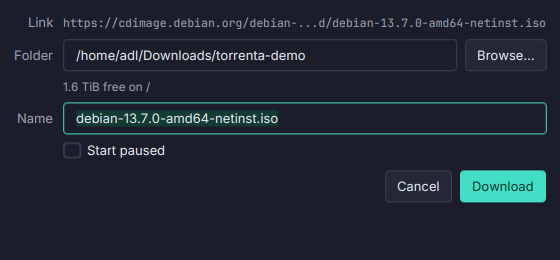
Paste, type or drop a link to a file that is not a torrent, and Torrenta downloads it with curl, in the same list as your torrents.
- The same list. Progress, rate, pause and resume (carrying on from where it stopped), remove with or without the file, a category, tags, a name of your own, Set Location and a download limit. The list survives a restart.
- Download Link, a small dialog: the folder with the free space there, the file’s name (kept over the one the server gives unless you leave it as the link’s own), and Start paused. “Add without asking” skips it.
- Easy to tell apart. A chain before the name, a From links entry in the sidebar’s Status section, and
is:link/is:torrentin the omnibox. Commands only a torrent understands are off for a download, and a mixed selection applies them to the torrents alone. - A few at once. Three run at the same time by default (Settings → Adding torrents → Links at once); the rest wait their turn.
- Inside the limits. The download limit, the alternative one included, is shared equally among the downloads from links; the torrents keep theirs.
- Safe names. The file grows under a
.partname in the download folder and takes the server’s name when it is done, never over a file that is already there. A link that turns out to be a.torrentis added as a torrent.
curl comes from the PATH unless Settings → Adding torrents → curl program names another, and it runs through the engine’s proxy. Downloads from links run on this machine whichever engine has the torrents, a Transmission daemon included.