
Content check
Before you add, the dialog names the files that deserve a look: a Film.mkv.exe, a hidden extension, a shortcut in an album, an archive that asks for a password.
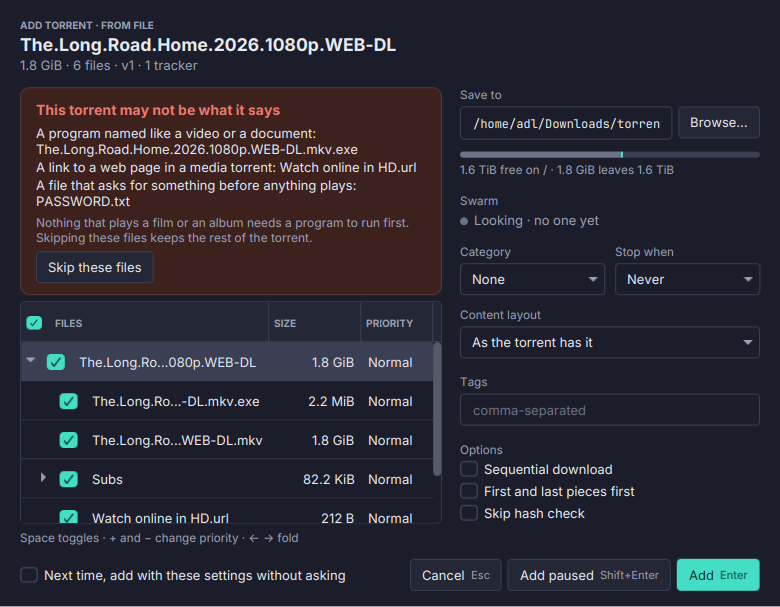
A torrent that promises a film and delivers a program is the oldest trick there is. Torrenta reads the file list before anything is downloaded and says what it finds.
- A card above the file tree in the Add dialog names each finding: a program named like a video or a document (
Film.mkv.exe, spaces before the last dot included), a name whose real extension is hidden by right-to-left characters, a Windows shortcut, a program or a link to a web page in a film or an album, an archive where the name promises a film and nothing else is there, a file named for a password or a codec. - Red for danger, amber for a caution. Skip these files unticks them and keeps the rest. A program in a software torrent is not flagged, and a file you skip stops being reported.
- Adds without a dialog run the same check. Watch folders, RSS rules, an article’s Download and Add without asking follow Settings → Adding torrents → Flagged files when adding without a dialog: skip those files (the default), refuse the torrent, or add them anyway. The event log says which, and what was found.
- Magnets too. A magnet has no file list yet, so it stops once its metadata is in, is checked, and then starts, starts without the flagged files, or is removed before anything was downloaded. A restart in between keeps it waiting.
- Encrypted archives, within seconds. A torrent’s first
.rar,.zipor.7zgets its first piece before anything else. If the archive is encrypted, its files or its names too, the Overview shows a red card saying so, with Skip that file and Remove the torrent. A torrent that hides its content behind a password usually sells the password.
The file-list check runs with either engine; the archive probe reads the downloaded piece, so it needs the files on this machine (libtorrent, not a remote Transmission daemon). See Adding torrents.