
Files already on disk
A new torrent's file that another torrent already has complete is linked into place, not downloaded again: no bytes written, every one still checked.
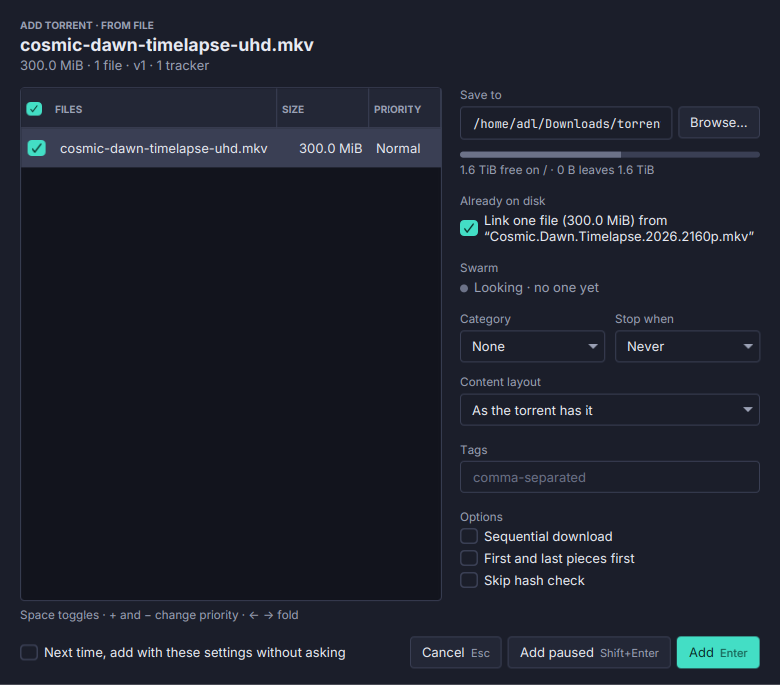
The same file often arrives in two torrents: a film on its own and in a collection, an image in two releases. Torrenta notices and does not fetch it twice.
- Matched by content, whatever the names. For v2 and hybrid torrents, by each file’s own hash. For a v1 torrent, when the file’s pieces hold nothing else (a single-file torrent, or a padded one) and the other torrent was made with the same piece size.
- The Add dialog offers it: an Already on disk line such as “Link 3 files (4.2 GB) from …”, ticked by default. A link writes no bytes; the two torrents share the file, and the add’s own check verifies every byte.
- Across drives, a file is copied instead: a clone where the file system can make one (so no space is used either), else a full copy, whose size the dialog shows first. Settings → Adding torrents → Files already on disk chooses: download them again, link and never copy, link and ask before copying (the default), or link and copy from other drives.
- Without a dialog too. Watch folders, RSS rules and adds without a dialog link without asking.
- The Files tab marks such a file and says where it came from (“Linked from …”).
A clone is cp --reflink on Linux and cp -c on macOS where the file system supports it; elsewhere a copy is a copy. Needs libtorrent. See Adding torrents.