
Import from another client
Bring your torrents over from qBittorrent, Transmission or Deluge at their progress, without a check, with their categories, tags and names.
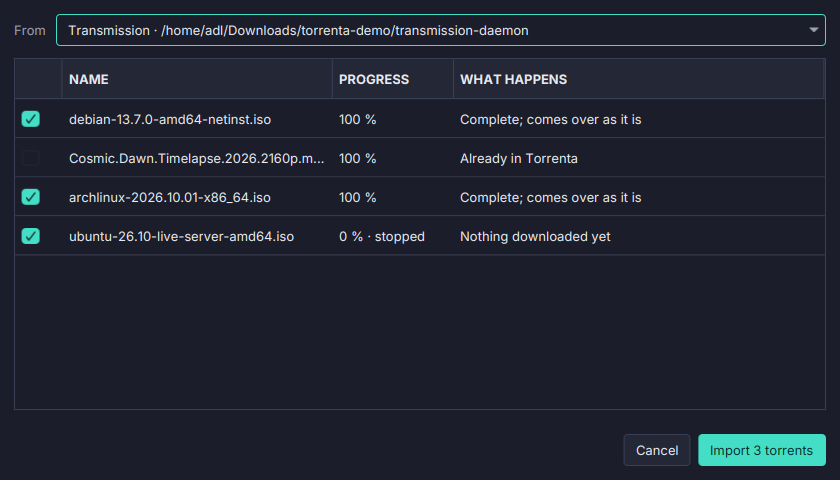
Moving to a new client should not mean checking a terabyte of seeds again. File → Import from another client… reads the other client’s own files and brings each torrent over as it was.
- Found for you. qBittorrent, Transmission (the daemon or the app) and Deluge on this machine, Flatpak’s included; or a folder you choose.
- A table first. Each torrent with what will happen to it, a tick per torrent as the plan advises.
- At their progress, without a check. Complete or part done, they come over as they were; stopped ones stay stopped.
- With what you gave them. Categories (and qBittorrent’s folders for them; Deluge’s label becomes the category), tags, the names you gave them and their files, and their own share limits.
- Never wrong. One whose files do not match what the other client recorded is checked as it is added and comes up short rather than wrong. One Torrenta already has, or one the other client is still writing, is left alone: close the other client first.
- The event log has the summary.
A qBittorrent that keeps its torrents in its SQLite database (an opt-in storage mode) is not read; the dialog says how to switch qBittorrent back to files and look again. Imports go into libtorrent, not into a remote Transmission daemon. See Importing from another client.