
Sidebar filters
Status, category, tag and tracker sections with a count on every entry, walked with the arrow keys. One choice per section, and the list shows what passes all of them.
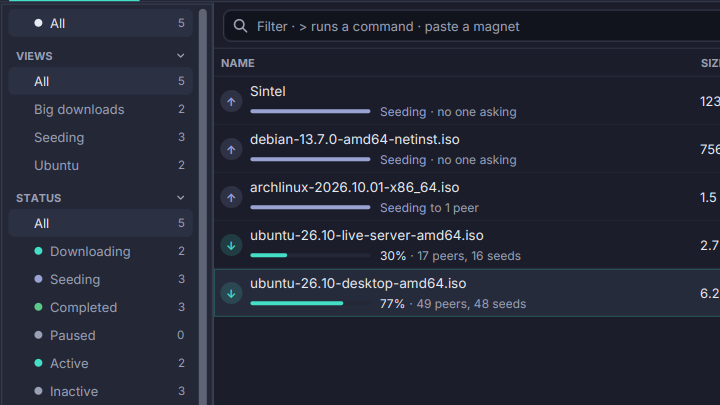
The sidebar keeps one choice per section, and the list shows the torrents that pass all of them, and the omnibox’s filter too.
- Status: Downloading, Seeding, Completed, Paused, Active, Inactive, Stalled, Checking, Errored, and From links.
- Categories and Tags, including Uncategorised and Untagged.
- Trackers, by host, plus Trackerless and Tracker error.
Every entry has a count. Ctrl+B focuses the sidebar: the arrows walk every section, Space makes an entry its section’s choice, Enter chooses and returns to the list, Esc returns without choosing, Left and Right fold a section. A click on a section’s heading folds it too. The palette has “Show: Downloading” and the rest, so a status is picked without leaving the list.
The sidebar sits on the left or the right, or is hidden (Ctrl+Shift+B). Drag its edge to make it wider or narrower; a double-click on the edge goes back to the default. The choices, the folded sections, the width and the place are remembered.