
Remote access: qBittorrent's web API
Speaks qBittorrent's WebUI API, so Sonarr, Radarr, Prowlarr and the phone apps connect as they are, and serves a web UI such as VueTorrent. Signed in, always.
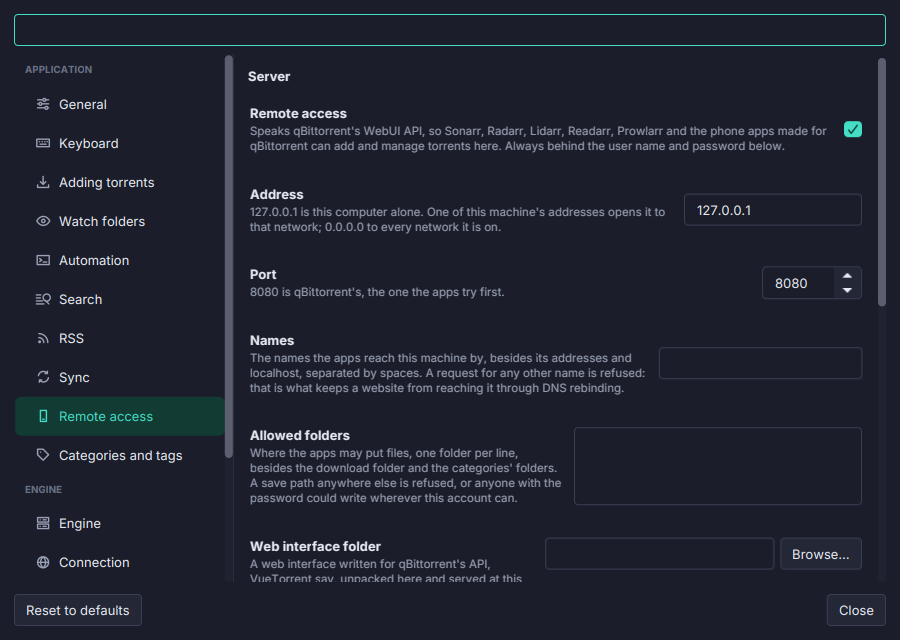
Everything written for qBittorrent’s web API can drive Torrenta: the *arr apps as a download client, remote apps on a phone, and alternative web interfaces.
- Sonarr, Radarr, Lidarr, Readarr, Prowlarr: add a qBittorrent download client with Torrenta’s address, port, user and password. Tried with Sonarr 4.0 and Radarr 6.4 through a whole grab, import and removal after seeding.
- A phone interface. Web interface folder serves a web UI written for qBittorrent, such as VueTorrent unpacked there, at the server’s address: a phone’s browser then runs Torrenta.
- What such interfaces need: the list and its changes (
sync/maindata), peers, file priorities, location, names, trackers, limits, the queue, categories and tags, the alternative speed limits, the preferences, the event log. - Held to the real thing. Every answer is compared, field by field, with a real qBittorrent 5.1.0’s recorded answers.
Shut by default, narrow when open. Off until switched on, and on 127.0.0.1:8080 until you choose an address. Sign-in always, with no localhost bypass; the password kept only as a salted hash, on this machine, never synced; five wrong tries ban an address for an hour. The Host header is checked against DNS rebinding and a browser’s Origin against the server itself; the session cookie is HttpOnly and SameSite=Strict. HTTPS from a PKCS#12 file, and a warning for an address other machines reach over plain HTTP. A save path outside the allowed folders is refused.
Not spoken yet: qBittorrent’s search/* and rss/*. See Remote access.