
Leak check
Bound to a VPN, Torrenta watches the interface, says at once when it drops, and with one setting checks where traffic really leaves.
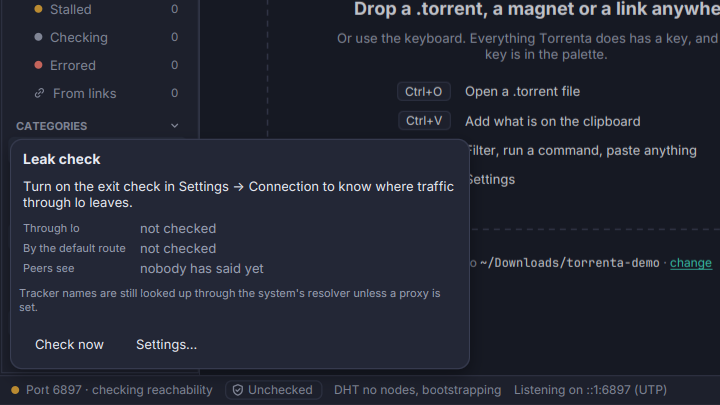
Binding Torrenta to a VPN’s interface is only as good as the binding. Since 0.3.0 Torrenta watches it.
- Every connection is bound. With Settings → Connection → Bind to set, the peers Torrenta dials leave from that address or interface too, not only the ones it accepts; none is dialled while it is missing. (Before 0.3.0 dialled peers left by the system’s own route.)
- A VPN that drops is said at once. Torrenta looks at the interface every five seconds: when it goes down or disappears, the port in the status bar turns red (“tun0 missing · reaching no one”) and the log says so. When it comes back, or its address changes, Torrenta binds to it again by itself.
- A shield beside the port says Protected, Exposed, Halted (the interface is down, so nothing goes out) or Unchecked; a click shows the three addresses it decided from.
- Check where traffic leaves (Settings → Connection, off by default, since it tells a server you choose this machine’s addresses): every ten minutes, an address-echo server (https://api.ipify.org unless you name another) is asked where traffic through the binding leaves and where the default route leaves. Exposed means peers see the default route’s address while the binding leaves elsewhere; a VPN that carries everything is never called a leak.
- Pause torrents when exposed pauses what runs while exposed, and resumes exactly those once protected again.
The port’s tooltip names the interface, its addresses, and the address peers see this machine as. Tracker names still resolve through the system’s resolver unless a proxy is set. Hidden for a remote engine, whose network is not this machine’s. See Connection.