
Report a Problem
A GitHub issue written from the debug log, with paths, names, hashes and addresses taken out first. Torrenta sends nothing itself.
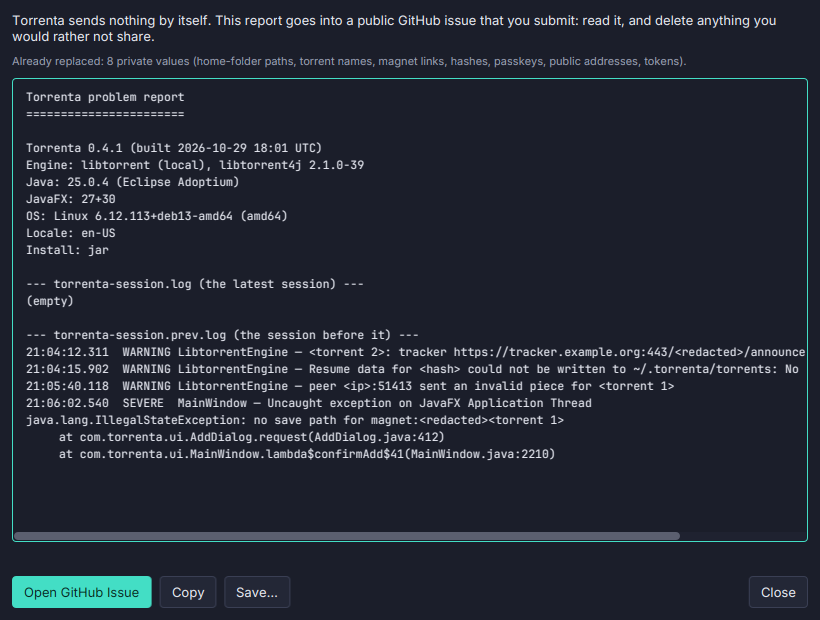
A good bug report needs the log, and a log is full of things you would rather not post. Help → Report a Problem… (also a button in the Debug Log window) writes the report for you.
- What goes in: this session’s and the last session’s logs, with the version, the engine, Java and the OS. The last session’s log survives a crash, so a report can be written after one.
- What is taken out first: home-folder paths, your user name, the torrents’ names, magnet links, info-hashes, tracker passkeys, public peer addresses, e-mail addresses and tokens.
- You read it before anyone else does. The report is editable. Open GitHub Issue copies it and opens a new issue with it filled in (or, when it is too long for the link, says to paste it). Copy and Save… are there too.
- When Torrenta will not start,
torrenta --reportwrites the report to the current folder and opens the issue, without starting the app. - Nothing is sent by Torrenta. The issue is filed by you, in your browser.
See the FAQ.